> ## Documentation Index
> Fetch the complete documentation index at: https://help.messagesync.ai/llms.txt
> Use this file to discover all available pages before exploring further.
# Migrate SMS Automations to WhatsApp
> Move your workflows from your CRM's native SMS trigger and actions to the WhatsApp QR custom provider's own triggers and actions.
If you connected WhatsApp the legacy way, it **overrides your sub-account's native SMS**. Your workflows still say **Send SMS** and **Customer Replied**, but the messages go out over WhatsApp.
That works. It just hides WhatsApp behind SMS - no attachments, no per-number routing, no WhatsApp filters, no reply-aware waits.
The **WhatsApp QR custom provider** adds its own triggers and actions to the workflow builder, so your automations run on WhatsApp on purpose instead of by inheritance. This guide swaps them, one workflow at a time.
| | **Legacy method (native SMS override)** | **WhatsApp QR custom provider** |
| ----------------------- | -------------------------------------------- | -------------------------------------------------------------------- |
| **How WhatsApp runs** | It overrides the sub-account's native SMS | As its own channel, linked by QR scan |
| **What you build with** | The CRM's **native** SMS trigger and actions | The WhatsApp provider's own triggers and actions |
| **Where they live** | The standard trigger and action lists | The **Apps** tab |
| **What you get** | Plain text - WhatsApp treated as SMS | Attachments, per-number sending, WhatsApp filters, reply-aware waits |
This page covers the **workflow side only**. For the connection itself, see [WhatsApp Setup](/whatsapp/full-setup) and [Legacy WhatsApp Setup](/whatsapp/sms-provider-setup).
Nothing breaks if you do nothing. While the native SMS override is in place, native **Send SMS** keeps delivering over WhatsApp. Migrating is about gaining WhatsApp's real capabilities, not repairing a broken setup.
***
## Do you need this guide?[](#do-you-need-this-guide "Direct link to Do you need this guide?")
You do if any published workflow uses one of these **and you expect it to reach people on WhatsApp**:
* **Send SMS** action
* **Customer Replied** trigger with Reply Channel set to SMS
* **Internal Notification** action on SMS or WhatsApp
* **Wait** action set to *the contact to reply* on SMS
***
## Before you start[](#before-you-start "Direct link to Before you start")
Make sure you have the **WhatsApp provider** app installed and updated; if not, contact your CRM support
Use the **WhatsApp Settings dashboard** to connect one or more instances
Until both are done, the WhatsApp triggers and actions will not appear on the **Apps** tab. If you cannot find them, you are either on the wrong tab or the app needs updating.
***
## What replaces what[](#what-replaces-what "Direct link to What replaces what")
| Today (native) | Switch to |
| -------------------------------------------- | ----------------------------------------------------------------------------------------------------------- |
| **Customer Replied**, Reply Channel = SMS | [**WhatsApp Inbound**](/automation/triggers/whatsapp-inbound) trigger |
| *Nothing - the trigger always had a contact* | **Find Contact** or **Create Contact** action |
| **Send SMS** | [**Send WhatsApp Message**](/automation/actions/send-whatsapp-message) action |
| **Internal Notification**, SMS or WhatsApp | [**Send Internal WhatsApp Notification**](/automation/actions/internal-notification-action-whatsapp) action |
| **Wait**, *the contact to reply* on SMS | [**Wait Step**](/automation/actions/wait-step), Channel = WhatsApp |
Every WhatsApp replacement lives on the **Apps** tab → **WhatsApp provider** app, never in the standard lists. **Find Contact** and **Create Contact** are CRM built-ins, already in every workflow.
***
## How to migrate a workflow[](#how-to-migrate-a-workflow "Direct link to How to migrate a workflow")
Work through one workflow at a time.
Copy the workflow and rename it, for example "Lead Follow-Up - WhatsApp". The original stays published and untouched while you build.
Replace **Customer Replied** with **WhatsApp Inbound**, then add **Find Contact** or **Create Contact** directly below it. Everything downstream depends on the contact existing.
Use the table above. Re-insert variables with the tag icon rather than pasting them, so they bind to the right field.
Tag checks, Intent Type, and Replied to Workflow become **If/Else** conditions after the contact step.
Message your connected number from your own phone and walk the whole path - reply arrives, contact resolved, message sends, internal alert lands.
Only once the new one is confirmed, set the old workflow back to **Draft**. Contacts already in it finish normally.
Never leave the old and new versions of the same workflow published at the same time - every contact gets messaged twice.
***
## 1. Customer Replied → WhatsApp Inbound[](#1-customer-replied--whatsapp-inbound "Direct link to 1. Customer Replied → WhatsApp Inbound")
| | **Customer Replied** | **WhatsApp Inbound** |
| -------------- | --------------------------------------------------------------------------------------------------------------- | -------------------------------------------------------------------------------------------------------------------------------- |
| **Fires when** | A contact replies to a message | A message arrives on a connected WhatsApp number, including a first-ever message from an unknown number |
| **Channels** | Email, SMS, WhatsApp, Social, All-in-One Chat | WhatsApp only |
| **Filters** | Contains Phrase, Exact Match Phrase, Has Tag, Doesn't Have Tag, Intent Type, Replied to Workflow, Reply Channel | Contact ID, Lid, Location ID, Message, Receiver Name, Receiver Phone Number, Sender Name, Sender Phone Number, WhatsApp Username |
| **Contact** | Always a known contact | You resolve it yourself - see [step 2](#2-resolve-the-contact-find-contact-or-create-contact) |
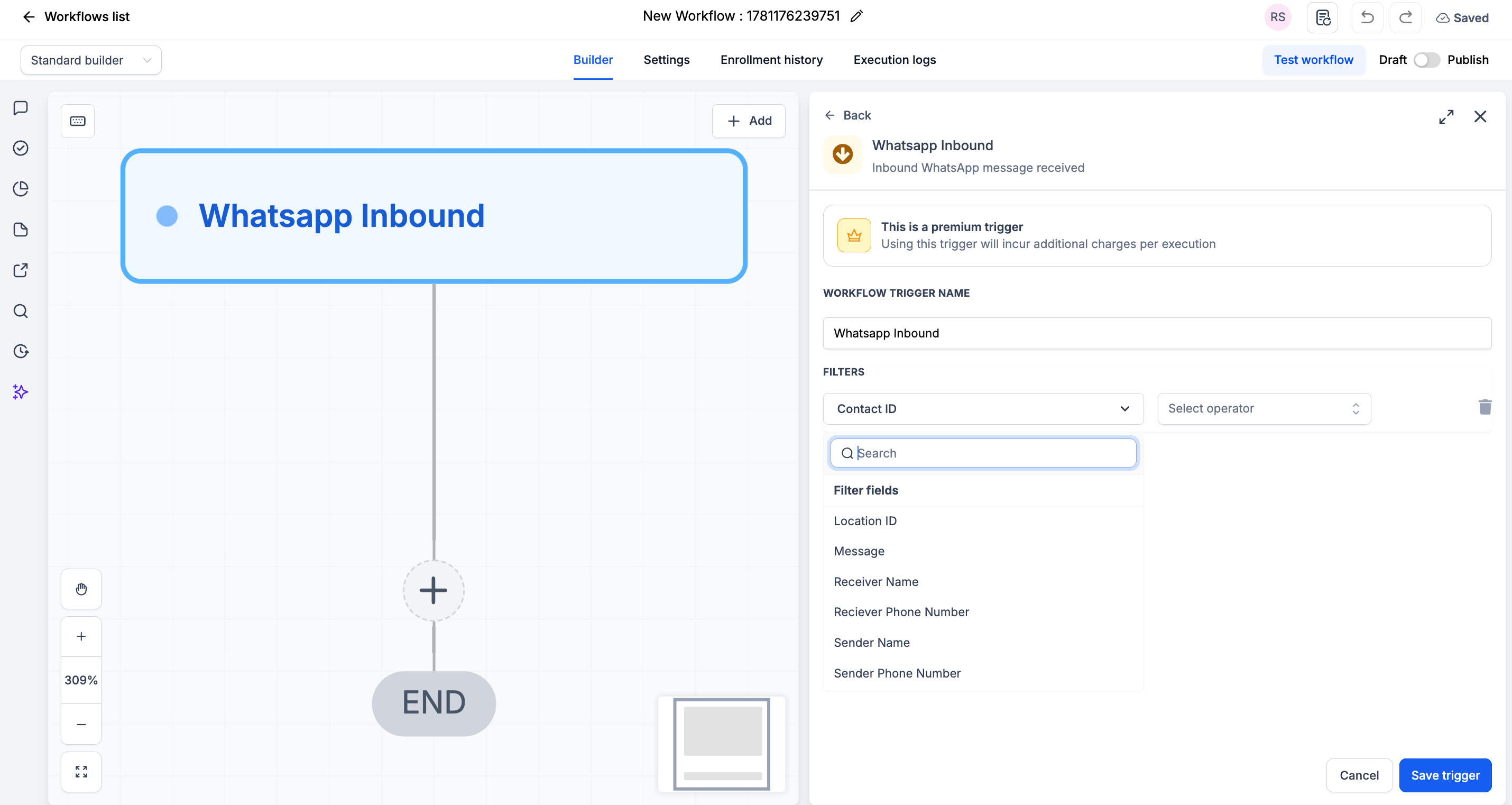 **What you gain** - filtering on *Receiver Phone Number* lets you run a different workflow per connected number, and the *Message contains* filter covers the keyword routing you did with **Contains Phrase**.
| Before | After |
| ------------------------------------------------------------------ | ---------------------------------------------------------------------------- |
| Customer Replied, Reply Channel = SMS, Contains Phrase = "pricing" | WhatsApp Inbound, Message *contains* "pricing" → Find Contact → your actions |
***
## 2. Resolve the contact: Find Contact or Create Contact[](#2-resolve-the-contact-find-contact-or-create-contact "Direct link to 2. Resolve the contact: Find Contact or Create Contact")
This step has no native equivalent, and skipping it is the number-one migration mistake. **Customer Replied** always handed the next step a known contact. **WhatsApp Inbound** does not - the message can come from a number that is not in your CRM yet. Add this action immediately after the trigger.
Both are CRM built-in actions, so there is nothing extra to install. Pick one:
| Action | Map this field | To this value |
| ------------------ | -------------- | ------------------------------------------------------------ |
| **Find Contact** | **ContactID** | *WhatsApp provider → Whatsapp Inbound → ContactID* |
| **Create Contact** | **Phone** | *WhatsApp provider → Whatsapp Inbound → Sender Phone Number* |
Click **+ Add** below the trigger
Search for and select **Find Contact** or **Create Contact**
Map the field from the table above, inserting the value with the tag icon
Click **Save action**
**What you gain** - filtering on *Receiver Phone Number* lets you run a different workflow per connected number, and the *Message contains* filter covers the keyword routing you did with **Contains Phrase**.
| Before | After |
| ------------------------------------------------------------------ | ---------------------------------------------------------------------------- |
| Customer Replied, Reply Channel = SMS, Contains Phrase = "pricing" | WhatsApp Inbound, Message *contains* "pricing" → Find Contact → your actions |
***
## 2. Resolve the contact: Find Contact or Create Contact[](#2-resolve-the-contact-find-contact-or-create-contact "Direct link to 2. Resolve the contact: Find Contact or Create Contact")
This step has no native equivalent, and skipping it is the number-one migration mistake. **Customer Replied** always handed the next step a known contact. **WhatsApp Inbound** does not - the message can come from a number that is not in your CRM yet. Add this action immediately after the trigger.
Both are CRM built-in actions, so there is nothing extra to install. Pick one:
| Action | Map this field | To this value |
| ------------------ | -------------- | ------------------------------------------------------------ |
| **Find Contact** | **ContactID** | *WhatsApp provider → Whatsapp Inbound → ContactID* |
| **Create Contact** | **Phone** | *WhatsApp provider → Whatsapp Inbound → Sender Phone Number* |
Click **+ Add** below the trigger
Search for and select **Find Contact** or **Create Contact**
Map the field from the table above, inserting the value with the tag icon
Click **Save action**
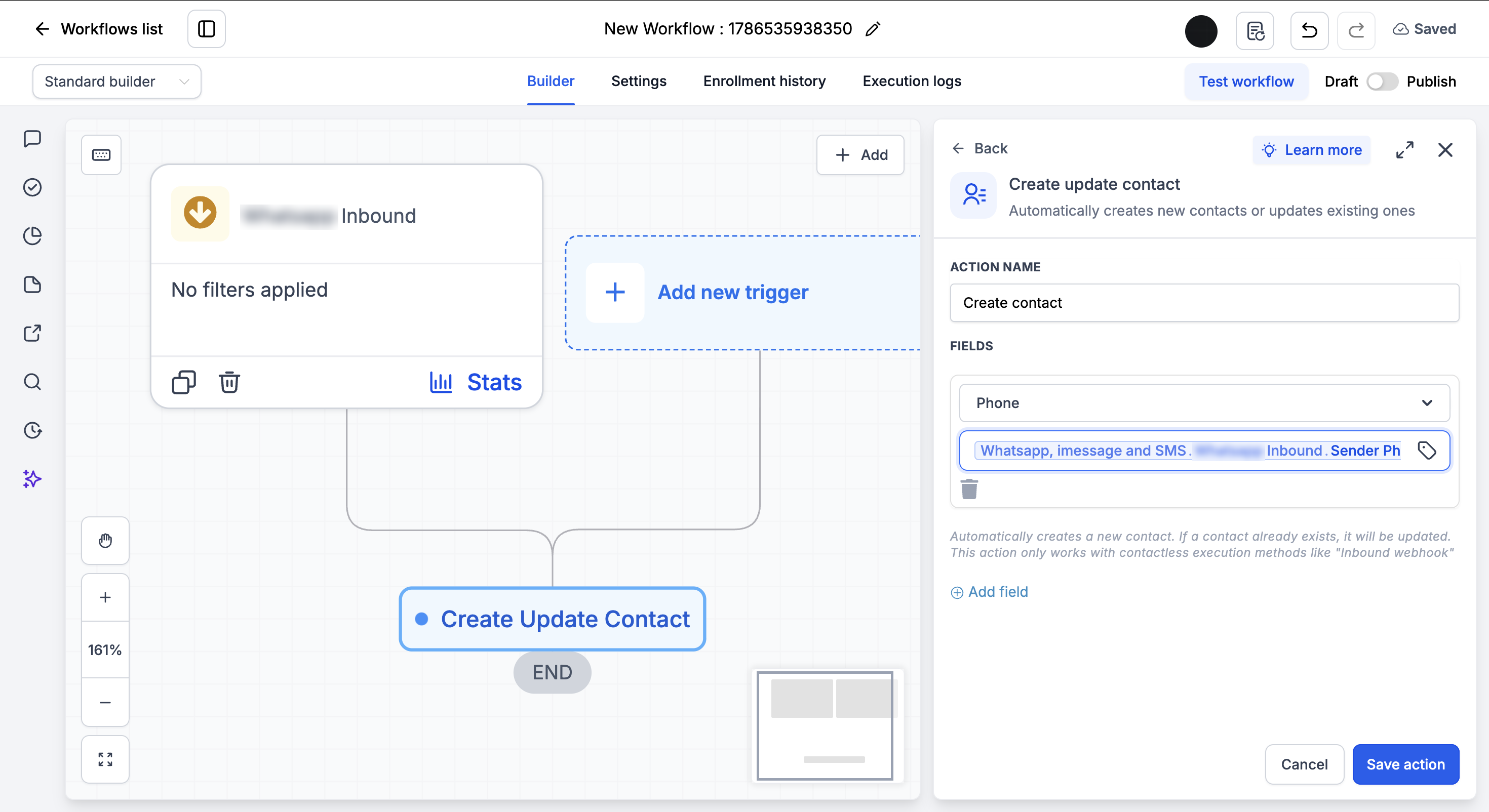 **Which one?** Use **Create Contact** when the sender may be new to your CRM - it skips creation if the contact already exists, so it never makes duplicates. Use **Find Contact** when every sender is already a saved contact and you only need to look them up.
Every action after this one - Send WhatsApp Message, Send Email, Create Task - then has a contact to work with.
***
## 3. Send SMS → Send WhatsApp Message[](#3-send-sms--send-whatsapp-message "Direct link to 3. Send SMS → Send WhatsApp Message")
| | **Send SMS** | **Send WhatsApp Message** |
| ------------------ | ----------------------------------------------------------------------------------------------------- | -------------------------------------------------------------------------------------- |
| **Channel** | SMS, reaching WhatsApp only because of the native SMS override | WhatsApp, explicitly |
| **Media** | Attachments go as MMS, subject to carrier size limits, and oversized files become media-library links | Real attachments: images, video, documents, from upload or the Media library |
| **Sending number** | Not selectable | Optional **WhatsApp Number** field, or leave empty for your dashboard's priority order |
| **Formatting** | Plain SMS text | Custom variables, emojis, and line breaks render as written |
**Which one?** Use **Create Contact** when the sender may be new to your CRM - it skips creation if the contact already exists, so it never makes duplicates. Use **Find Contact** when every sender is already a saved contact and you only need to look them up.
Every action after this one - Send WhatsApp Message, Send Email, Create Task - then has a contact to work with.
***
## 3. Send SMS → Send WhatsApp Message[](#3-send-sms--send-whatsapp-message "Direct link to 3. Send SMS → Send WhatsApp Message")
| | **Send SMS** | **Send WhatsApp Message** |
| ------------------ | ----------------------------------------------------------------------------------------------------- | -------------------------------------------------------------------------------------- |
| **Channel** | SMS, reaching WhatsApp only because of the native SMS override | WhatsApp, explicitly |
| **Media** | Attachments go as MMS, subject to carrier size limits, and oversized files become media-library links | Real attachments: images, video, documents, from upload or the Media library |
| **Sending number** | Not selectable | Optional **WhatsApp Number** field, or leave empty for your dashboard's priority order |
| **Formatting** | Plain SMS text | Custom variables, emojis, and line breaks render as written |
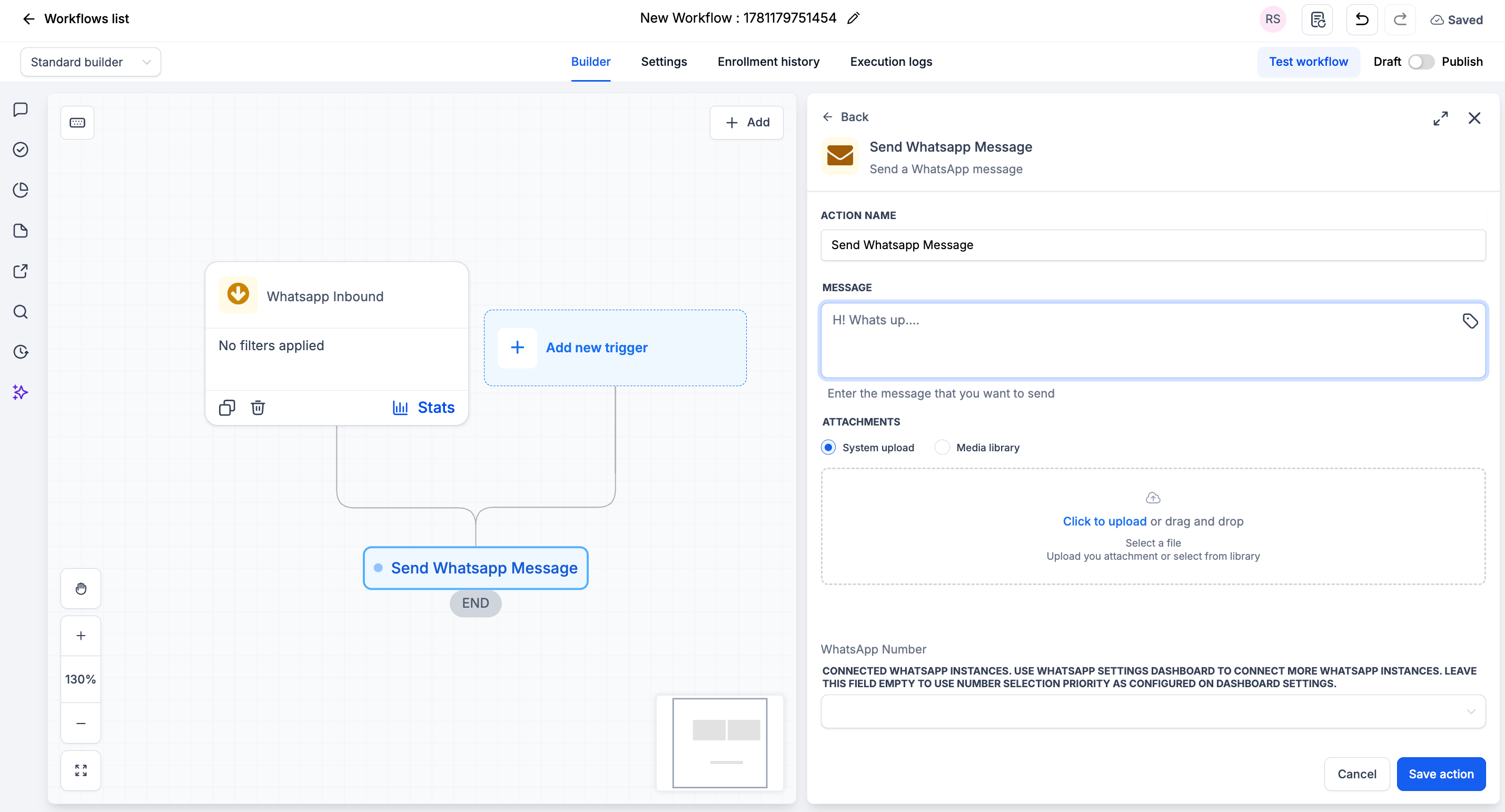 | Before | After |
| --------------------------------------------------------------------------- | ------------------------------------------------------------------------------------------------------------------------------------------- |
| Send SMS: "Hi `{{contact.first_name}}`, thanks! Link: example.com/brochure" | Send WhatsApp Message: "Hi `{{contact.first_name}}`! Thanks for your interest, we will be in touch shortly." with the brochure PDF attached |
***
## 4. Internal Notification → Send Internal WhatsApp Notification[](#4-internal-notification--send-internal-whatsapp-notification "Direct link to 4. Internal Notification → Send Internal WhatsApp Notification")
| | **Internal Notification** | **Send Internal WhatsApp Notification** |
| ---------------------- | ------------------------------------------ | -------------------------------------------------- |
| **Delivery** | Pick one: Email, In-App, SMS, or WhatsApp | WhatsApp **and** the CRM at once |
| **Recipients** | All Users, Particular Users, Assigned User | Assigned Users, Particular User, **Custom Number** |
| **Outside the team** | Not possible | **Custom Number** reaches any phone number |
| **WhatsApp templates** | Must use approved templates | None needed - write the message you want |
| Before | After |
| --------------------------------------------------------------------------- | ------------------------------------------------------------------------------------------------------------------------------------------- |
| Send SMS: "Hi `{{contact.first_name}}`, thanks! Link: example.com/brochure" | Send WhatsApp Message: "Hi `{{contact.first_name}}`! Thanks for your interest, we will be in touch shortly." with the brochure PDF attached |
***
## 4. Internal Notification → Send Internal WhatsApp Notification[](#4-internal-notification--send-internal-whatsapp-notification "Direct link to 4. Internal Notification → Send Internal WhatsApp Notification")
| | **Internal Notification** | **Send Internal WhatsApp Notification** |
| ---------------------- | ------------------------------------------ | -------------------------------------------------- |
| **Delivery** | Pick one: Email, In-App, SMS, or WhatsApp | WhatsApp **and** the CRM at once |
| **Recipients** | All Users, Particular Users, Assigned User | Assigned Users, Particular User, **Custom Number** |
| **Outside the team** | Not possible | **Custom Number** reaches any phone number |
| **WhatsApp templates** | Must use approved templates | None needed - write the message you want |
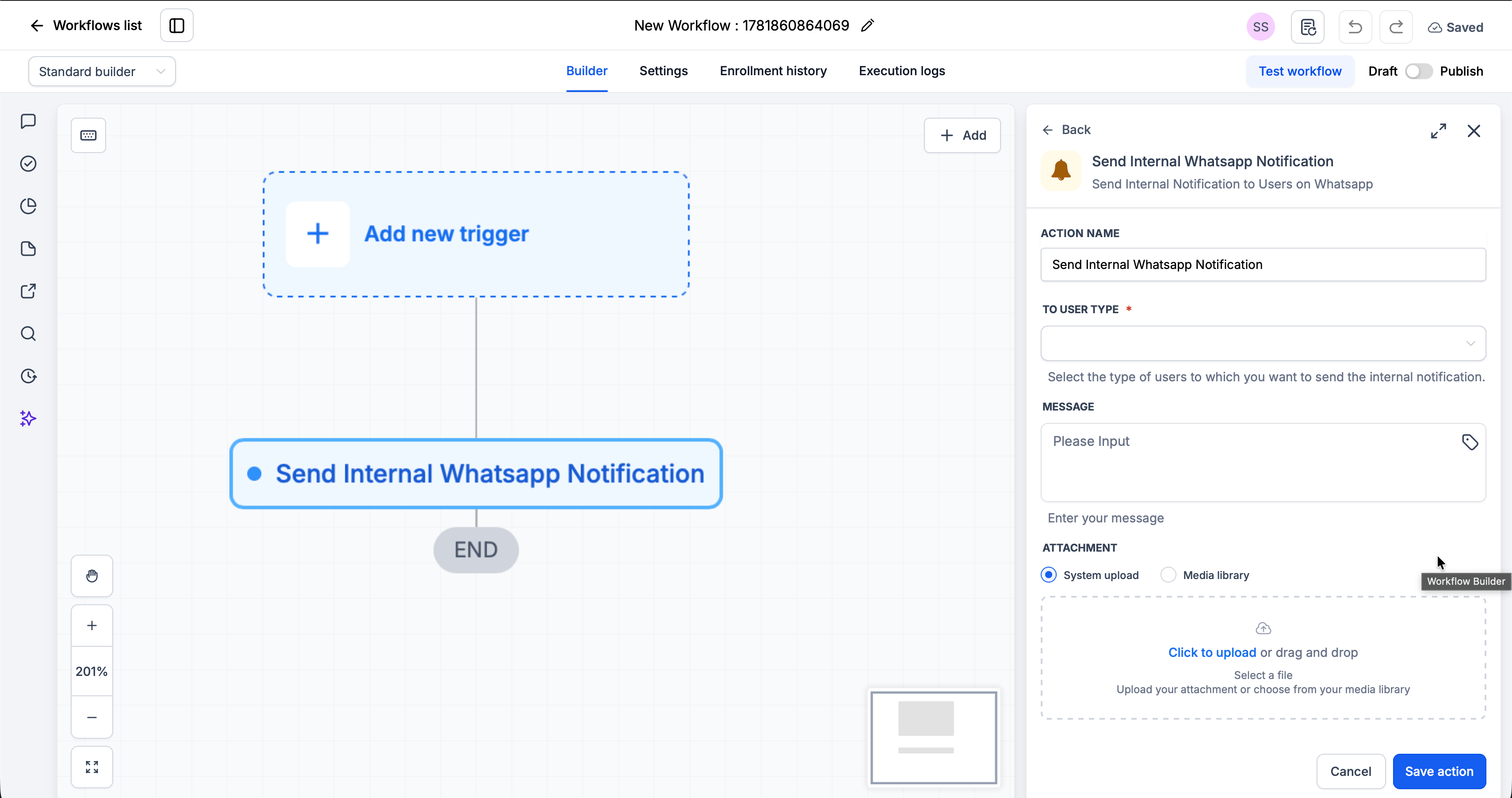 Map your old recipient setting onto **To User Type**:
| Was | Set To User Type to |
| ----------------------------- | -------------------------------------------------------- |
| Assigned User | **Assigned Users** |
| Particular Users | **Particular User**, then pick people in **Choose User** |
| All Users | **Particular User**, and select everyone who needs it |
| An external or on-call number | **Custom Number** |
| Before | After |
| ------------------------------------------------------------------------------- | ------------------------------------------------------------------------------------------------------------------------------- |
| Customer Replied → Internal Notification, SMS, Assigned User, "Contact replied" | WhatsApp Inbound → Find Contact → Send Internal WhatsApp Notification, Assigned Users, "`{{contact.first_name}}` just replied." |
***
## 5. Wait → Wait Step[](#5-wait--wait-step "Direct link to 5. Wait → Wait Step")
**Only one flavour of Wait migrates.** The native **Wait** handles eight kinds of waiting. The **Wait Step** replaces exactly one - *the contact to reply* - and only on your connected WhatsApp, iMessage, or SMS number. Everything else stays native, and the two work together in the same workflow.
| What you want | Use |
| ----------------------------------------------------------------------------- | --------------- |
| A fixed delay, a date, a recurring schedule, an appointment offset | **Native Wait** |
| A trigger-link click, an email open, a field condition, a team member's reply | **Native Wait** |
| The *customer* to reply on your connected WhatsApp number | **Wait Step** |
| To branch on whether they replied, and use what they said downstream | **Wait Step** |
| A reply to one specific connected number only | **Wait Step** |
**What you gain**
* **The reply comes with it.** Message text and attachments are handed to the steps after **Customer Responded**, so you can branch on what the customer actually said
* **Two named branches** - **Customer Responded** and **Timeout** - instead of one path with a timeout escape
* **Per-number scoping** with the optional **Connected Number** field
**Using both together**
```text theme={null}
Send WhatsApp Message: "Hi {{contact.first_name}}, confirming tomorrow at 3pm. Reply YES to confirm."
|
Wait Step - Channel: WhatsApp - Timeout: 1 day
|-- Customer Responded -> If/Else on the reply text
| |-- contains "yes" -> add tag "confirmed"
| |-- else -> Send Internal WhatsApp Notification to the assigned user
|-- Timeout -> Native Wait (2 hours) -> Send WhatsApp Message: "Just checking you got this?"
```
***
## FAQs[](#faqs "Direct link to FAQs")
Yes, and it is the recommended way to migrate gradually. It is also required when part of the workflow needs a native-only feature, such as an email internal notification or a recurring-schedule Wait.
They only appear under the **Apps** tab, never in the standard lists. If the Apps tab has no WhatsApp provider app, make sure the app is installed and updated (if not, contact your CRM support) and connect at least one number.
**Create Contact** when the sender may be new to your CRM - it skips creation for existing contacts, so no duplicates are made. **Find Contact** when every sender is already saved and you only need to look them up.
They finish the workflow they are in. Setting it back to Draft only stops new contacts entering, so let in-flight contacts drain before you delete anything.
Those filters do not exist on **WhatsApp Inbound**. Leave the trigger unfiltered or filter on message text, then add an **If/Else** after the contact step to check tags or any other contact field.
Only the ones set to *the contact to reply* on SMS. Every other kind of Wait stays on the native action.
***
## Support
If you need help with the migration:
* Email: [**support@messagesync.ai**](mailto:support@messagesync.ai)
Map your old recipient setting onto **To User Type**:
| Was | Set To User Type to |
| ----------------------------- | -------------------------------------------------------- |
| Assigned User | **Assigned Users** |
| Particular Users | **Particular User**, then pick people in **Choose User** |
| All Users | **Particular User**, and select everyone who needs it |
| An external or on-call number | **Custom Number** |
| Before | After |
| ------------------------------------------------------------------------------- | ------------------------------------------------------------------------------------------------------------------------------- |
| Customer Replied → Internal Notification, SMS, Assigned User, "Contact replied" | WhatsApp Inbound → Find Contact → Send Internal WhatsApp Notification, Assigned Users, "`{{contact.first_name}}` just replied." |
***
## 5. Wait → Wait Step[](#5-wait--wait-step "Direct link to 5. Wait → Wait Step")
**Only one flavour of Wait migrates.** The native **Wait** handles eight kinds of waiting. The **Wait Step** replaces exactly one - *the contact to reply* - and only on your connected WhatsApp, iMessage, or SMS number. Everything else stays native, and the two work together in the same workflow.
| What you want | Use |
| ----------------------------------------------------------------------------- | --------------- |
| A fixed delay, a date, a recurring schedule, an appointment offset | **Native Wait** |
| A trigger-link click, an email open, a field condition, a team member's reply | **Native Wait** |
| The *customer* to reply on your connected WhatsApp number | **Wait Step** |
| To branch on whether they replied, and use what they said downstream | **Wait Step** |
| A reply to one specific connected number only | **Wait Step** |
**What you gain**
* **The reply comes with it.** Message text and attachments are handed to the steps after **Customer Responded**, so you can branch on what the customer actually said
* **Two named branches** - **Customer Responded** and **Timeout** - instead of one path with a timeout escape
* **Per-number scoping** with the optional **Connected Number** field
**Using both together**
```text theme={null}
Send WhatsApp Message: "Hi {{contact.first_name}}, confirming tomorrow at 3pm. Reply YES to confirm."
|
Wait Step - Channel: WhatsApp - Timeout: 1 day
|-- Customer Responded -> If/Else on the reply text
| |-- contains "yes" -> add tag "confirmed"
| |-- else -> Send Internal WhatsApp Notification to the assigned user
|-- Timeout -> Native Wait (2 hours) -> Send WhatsApp Message: "Just checking you got this?"
```
***
## FAQs[](#faqs "Direct link to FAQs")
Yes, and it is the recommended way to migrate gradually. It is also required when part of the workflow needs a native-only feature, such as an email internal notification or a recurring-schedule Wait.
They only appear under the **Apps** tab, never in the standard lists. If the Apps tab has no WhatsApp provider app, make sure the app is installed and updated (if not, contact your CRM support) and connect at least one number.
**Create Contact** when the sender may be new to your CRM - it skips creation for existing contacts, so no duplicates are made. **Find Contact** when every sender is already saved and you only need to look them up.
They finish the workflow they are in. Setting it back to Draft only stops new contacts entering, so let in-flight contacts drain before you delete anything.
Those filters do not exist on **WhatsApp Inbound**. Leave the trigger unfiltered or filter on message text, then add an **If/Else** after the contact step to check tags or any other contact field.
Only the ones set to *the contact to reply* on SMS. Every other kind of Wait stays on the native action.
***
## Support
If you need help with the migration:
* Email: [**support@messagesync.ai**](mailto:support@messagesync.ai)