> ## Documentation Index
> Fetch the complete documentation index at: https://help.messagesync.ai/llms.txt
> Use this file to discover all available pages before exploring further.
# Shareable QR Link for WhatsApp Connection
> The feature generates a temporary connection link that allows anyone to connect a WhatsApp account without CRM login credentials. The link is valid for and provides direct access to the WhatsApp QR code scanning page.
This is useful for agencies setting up client accounts, business owners delegating WhatsApp management to team members, or any scenario where you need someone to connect WhatsApp without granting CRM access.
***
## Key Benefits[](#key-benefits "Direct link to Key Benefits")
**Secure Delegation** - Share connection access without exposing CRM credentials
**Time-Limited** - Links automatically expire after 1 hour
**No Login Required** - Recipients connect through a simple browser link
**Quick Setup** - Connection takes seconds with no authentication needed
***
## Who Should Use It[](#who-should-use-it "Direct link to Who Should Use It")
**Agencies** - Set up client WhatsApp accounts without requesting CRM passwords
**Business owners** - Allow team members to connect WhatsApp without full system access
**Account managers** - Enable self-service WhatsApp setup for clients
***
## How to Generate a Shareable Link[](#how-to-generate-a-shareable-link "Direct link to How to Generate a Shareable Link")
### Step 1: Navigate to WhatsApp Section[](#step-1-navigate-to-whatsapp-section "Direct link to Step 1: Navigate to WhatsApp Section")
Log into your CRM dashboard
Click **Message Hub** in the left sidebar
Select the WhatsApp instance and click on **Manage** button
### Step 2: Generate the Link[](#step-2-generate-the-link "Direct link to Step 2: Generate the Link")
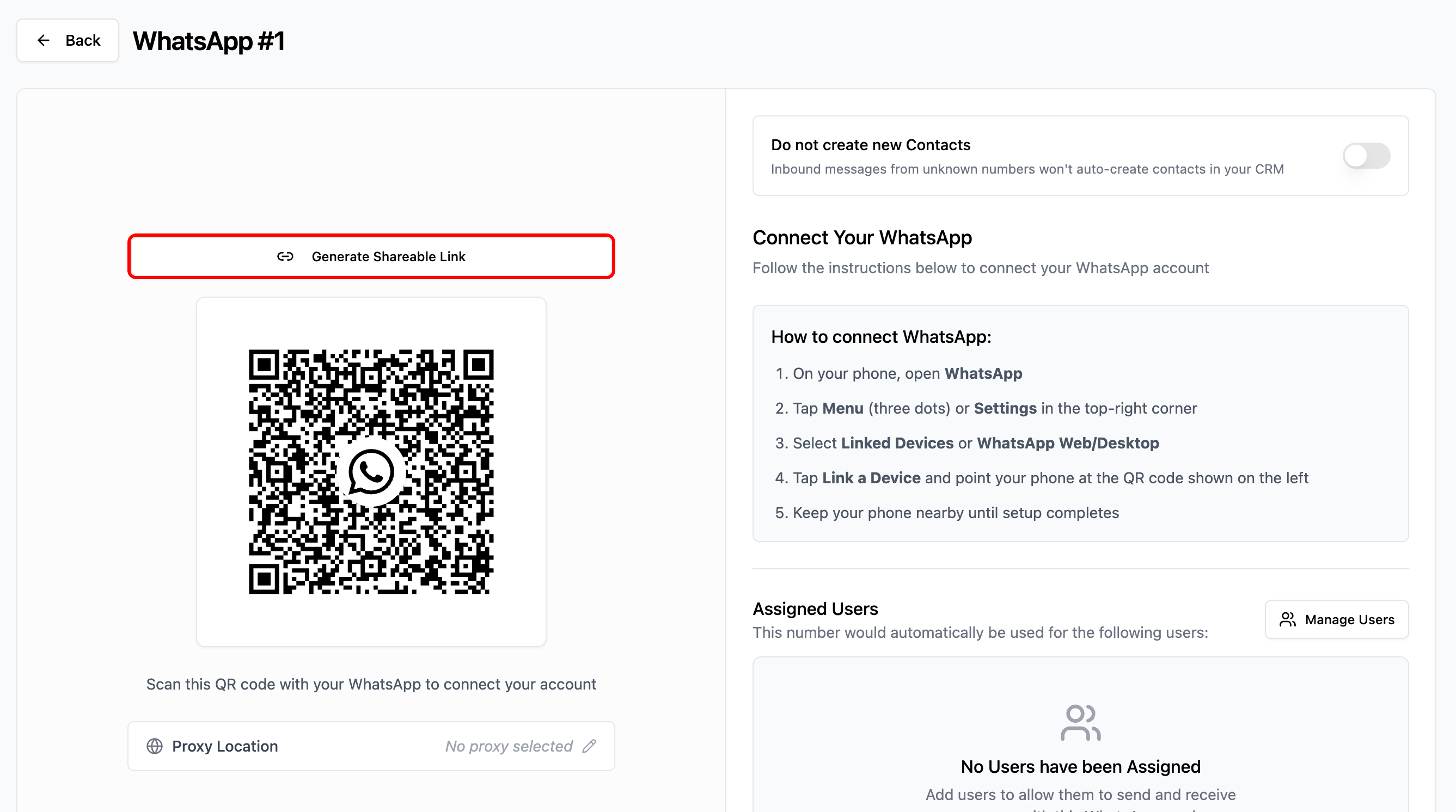
Look for the QR code section
Click **Generate Shareable Link** above the QR code
Then copy the link to your clipboard
Share the link with the person who will connect WhatsApp
> **Important:** The link expires in 1 hour. Generate a new link if it expires before use.
 ***
## How Recipients Use the Link[](#how-recipients-use-the-link "Direct link to How Recipients Use the Link")
### Step 1: Open the Link[](#step-1-open-the-link "Direct link to Step 1: Open the Link")
* Click the link or paste it into any web browser
* A connection page will load showing the WhatsApp QR code
### Step 2: Scan the QR Code[](#step-2-scan-the-qr-code "Direct link to Step 2: Scan the QR Code")
Open WhatsApp on your mobile device
Tap **Menu** (three dots) or **Settings**
Select **Linked Devices** or **WhatsApp Web/Desktop**
Tap **Link a Device**
Scan the QR code displayed in the browser
### Step 3: Connection Complete[](#step-3-connection-complete "Direct link to Step 3: Connection Complete")
* The QR code will show **Connected**
* Message confirms the account is connected and ready
* Browser can be closed
***
## Important Notes[](#important-notes "Direct link to Important Notes")
### Security:[](#security "Direct link to Security:")
* Each link expires after 1 hour
* Recipients cannot access the CRM dashboard through the link
* Only grants WhatsApp connection capability
### Best Practices:[](#best-practices "Direct link to Best Practices:")
* Only share links with trusted individuals
* Use links promptly after generation
* Generate a new link if the first one expires
### Requirements:[](#requirements "Direct link to Requirements:")
* Recipients need a web browser and internet connection
* WhatsApp mobile app is required for scanning
* Only one WhatsApp account can be connected per instance
***
## Troubleshooting[](#troubleshooting "Direct link to Troubleshooting")
### Link Does Not Open[](#link-does-not-open "Direct link to Link Does Not Open")
* Verify the complete URL was copied correctly
* Try a different browser
* Generate a new link if expired
### QR Code Does Not Scan[](#qr-code-does-not-scan "Direct link to QR Code Does Not Scan")
* Ensure good lighting on the screen
* Hold phone steady at proper distance
* Refresh the page to generate a new QR code
* Update WhatsApp app to latest version
### Connection Fails[](#connection-fails "Direct link to Connection Fails")
* Check internet connection on both devices
* Generate a new shareable link
* Ensure WhatsApp instance still exists in CRM
### Link Expired[](#link-expired "Direct link to Link Expired")
* Links expire after 1 hour for security
* Generate a new link from the CRM
* Share the new link with the recipient
***
## Support[](#support "Direct link to Support")
We're happy to help you with any questions about shareable QR links.
* WhatsApp chat: [Chat on WhatsApp](https://wa.me/+12267248710?text=Hi%2C%20I%20need%20help%20with%20shareable%20QR%20links.)
* Email: [support@messagesync.ai](mailto:support@messagesync.ai)
***
## FAQs[](#faqs "Direct link to FAQs")
The shareable link expires after 1 hour from generation. Generate a new link if it expires.
No. The link only provides access to the WhatsApp connection page. Recipients cannot access any CRM features or data.
Yes, you can generate new links at any time. However, only one WhatsApp account can be connected per instance.
No. Recipients only need the link URL and their WhatsApp mobile app.
Simply generate a new shareable link from the CRM and share it with the recipient.
No. Generate a new link for each connection attempt.
The connection will fail and the recipient will see an error message.
The CRM shows which WhatsApp number is connected but does not log who performed the connection.
***
## How Recipients Use the Link[](#how-recipients-use-the-link "Direct link to How Recipients Use the Link")
### Step 1: Open the Link[](#step-1-open-the-link "Direct link to Step 1: Open the Link")
* Click the link or paste it into any web browser
* A connection page will load showing the WhatsApp QR code
### Step 2: Scan the QR Code[](#step-2-scan-the-qr-code "Direct link to Step 2: Scan the QR Code")
Open WhatsApp on your mobile device
Tap **Menu** (three dots) or **Settings**
Select **Linked Devices** or **WhatsApp Web/Desktop**
Tap **Link a Device**
Scan the QR code displayed in the browser
### Step 3: Connection Complete[](#step-3-connection-complete "Direct link to Step 3: Connection Complete")
* The QR code will show **Connected**
* Message confirms the account is connected and ready
* Browser can be closed
***
## Important Notes[](#important-notes "Direct link to Important Notes")
### Security:[](#security "Direct link to Security:")
* Each link expires after 1 hour
* Recipients cannot access the CRM dashboard through the link
* Only grants WhatsApp connection capability
### Best Practices:[](#best-practices "Direct link to Best Practices:")
* Only share links with trusted individuals
* Use links promptly after generation
* Generate a new link if the first one expires
### Requirements:[](#requirements "Direct link to Requirements:")
* Recipients need a web browser and internet connection
* WhatsApp mobile app is required for scanning
* Only one WhatsApp account can be connected per instance
***
## Troubleshooting[](#troubleshooting "Direct link to Troubleshooting")
### Link Does Not Open[](#link-does-not-open "Direct link to Link Does Not Open")
* Verify the complete URL was copied correctly
* Try a different browser
* Generate a new link if expired
### QR Code Does Not Scan[](#qr-code-does-not-scan "Direct link to QR Code Does Not Scan")
* Ensure good lighting on the screen
* Hold phone steady at proper distance
* Refresh the page to generate a new QR code
* Update WhatsApp app to latest version
### Connection Fails[](#connection-fails "Direct link to Connection Fails")
* Check internet connection on both devices
* Generate a new shareable link
* Ensure WhatsApp instance still exists in CRM
### Link Expired[](#link-expired "Direct link to Link Expired")
* Links expire after 1 hour for security
* Generate a new link from the CRM
* Share the new link with the recipient
***
## Support[](#support "Direct link to Support")
We're happy to help you with any questions about shareable QR links.
* WhatsApp chat: [Chat on WhatsApp](https://wa.me/+12267248710?text=Hi%2C%20I%20need%20help%20with%20shareable%20QR%20links.)
* Email: [support@messagesync.ai](mailto:support@messagesync.ai)
***
## FAQs[](#faqs "Direct link to FAQs")
The shareable link expires after 1 hour from generation. Generate a new link if it expires.
No. The link only provides access to the WhatsApp connection page. Recipients cannot access any CRM features or data.
Yes, you can generate new links at any time. However, only one WhatsApp account can be connected per instance.
No. Recipients only need the link URL and their WhatsApp mobile app.
Simply generate a new shareable link from the CRM and share it with the recipient.
No. Generate a new link for each connection attempt.
The connection will fail and the recipient will see an error message.
The CRM shows which WhatsApp number is connected but does not log who performed the connection.