> ## Documentation Index
> Fetch the complete documentation index at: https://help.messagesync.ai/llms.txt
> Use this file to discover all available pages before exploring further.
# WhatsApp Groups & Community Announcements
## WhatsApp Groups & Community Announcements
We’re excited to announce that **WhatsApp Groups** and **Community Announcements** are now fully supported on our system!
You can now **send, receive, and automate** group conversations directly inside the CRM, just like you would with individual contacts.
***
## What It Does
* Connect your existing WhatsApp Groups to the CRM
* Choose which groups to enable (no need to connect private or irrelevant ones)
* Auto-sync groups on first message no manual setup required
* Send and receive group messages directly inside the **CRM Conversations tab**
* Automate group interactions using **CRM workflows**
* Assign each group a unique identifier so they behave like regular contacts
* Leverage **Community Announcements** for one-way broadcasts to large audiences
***
## Key Benefits
* **Centralized communication:** Handle individual + group chats inside CRM
* **Selective control:** Enable only the groups you want for business use
* **Automation ready:** Trigger workflows, reminders, or broadcasts to groups
* **Scalable outreach:** Use Community Announcements for bulk, one-to-many updates
* **Better client engagement:** Collaborate with teams, communities, or clients without switching platforms
***
## Who Should Use It
* **Agencies** managing multiple client groups or communities
* **Real estate teams** handling property discussion groups
* **Coaches and consultants** running private student/mentee groups
* **Support teams** offering group updates or onboarding sessions
* **Community managers** who want to keep announcements and engagement structured
***
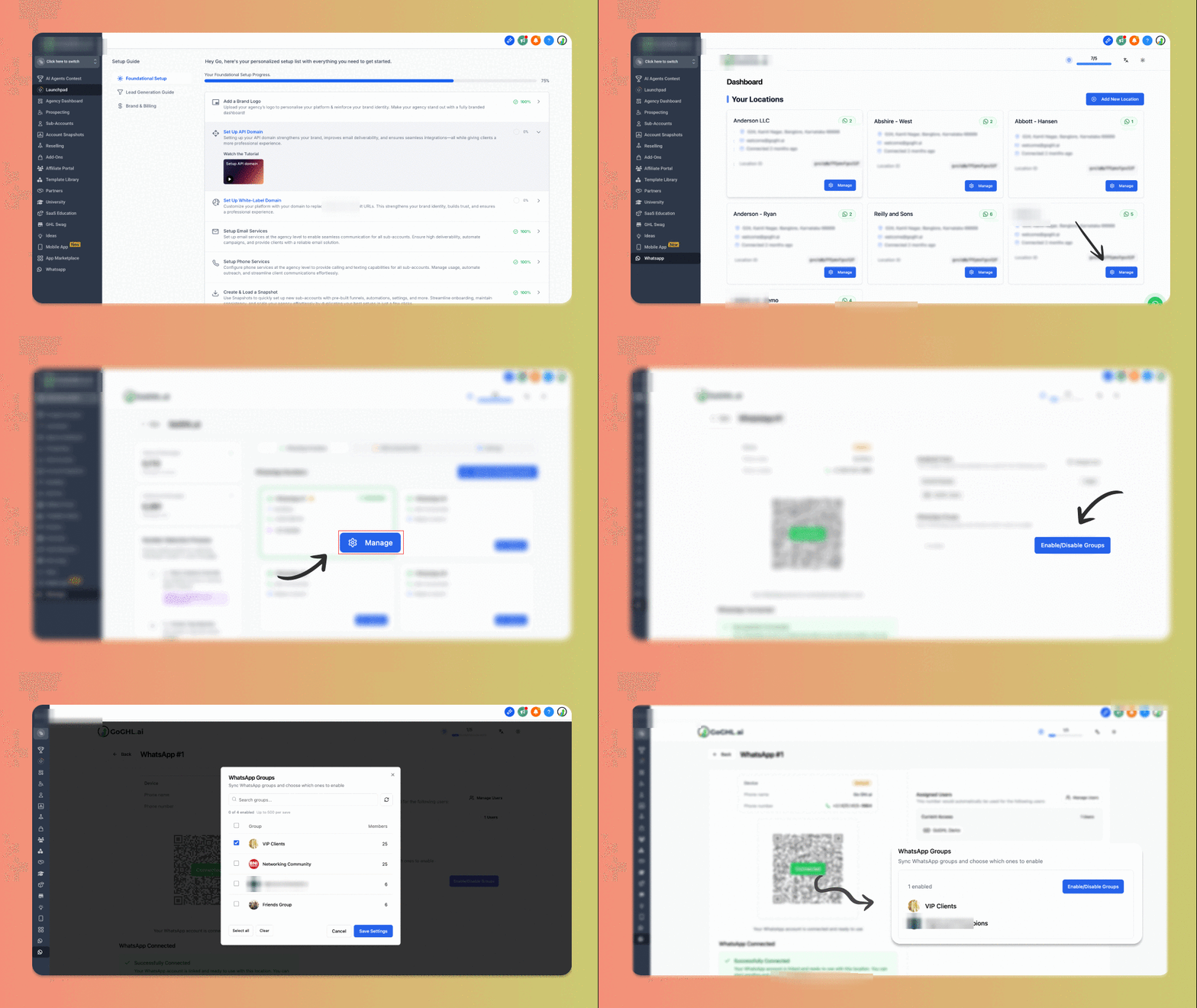
## How to Enable WhatsApp Groups
Go to your **Message hub tab** inside the CRM
Click **Manage** on the WhatsApp number you want to enable groups for
Under the **Manage WhatsApp view**, click **Enable/Disable Groups**
Select only the groups you want to enable in CRM (leave out private groups)
Save changes
Once enabled:
* Groups appear in your CRM dashboard like regular contacts
* You can send/receive messages in **Conversations**
* You can run **automations & workflows** on group interactions
 ***
## Auto-sync WhatsApp Groups
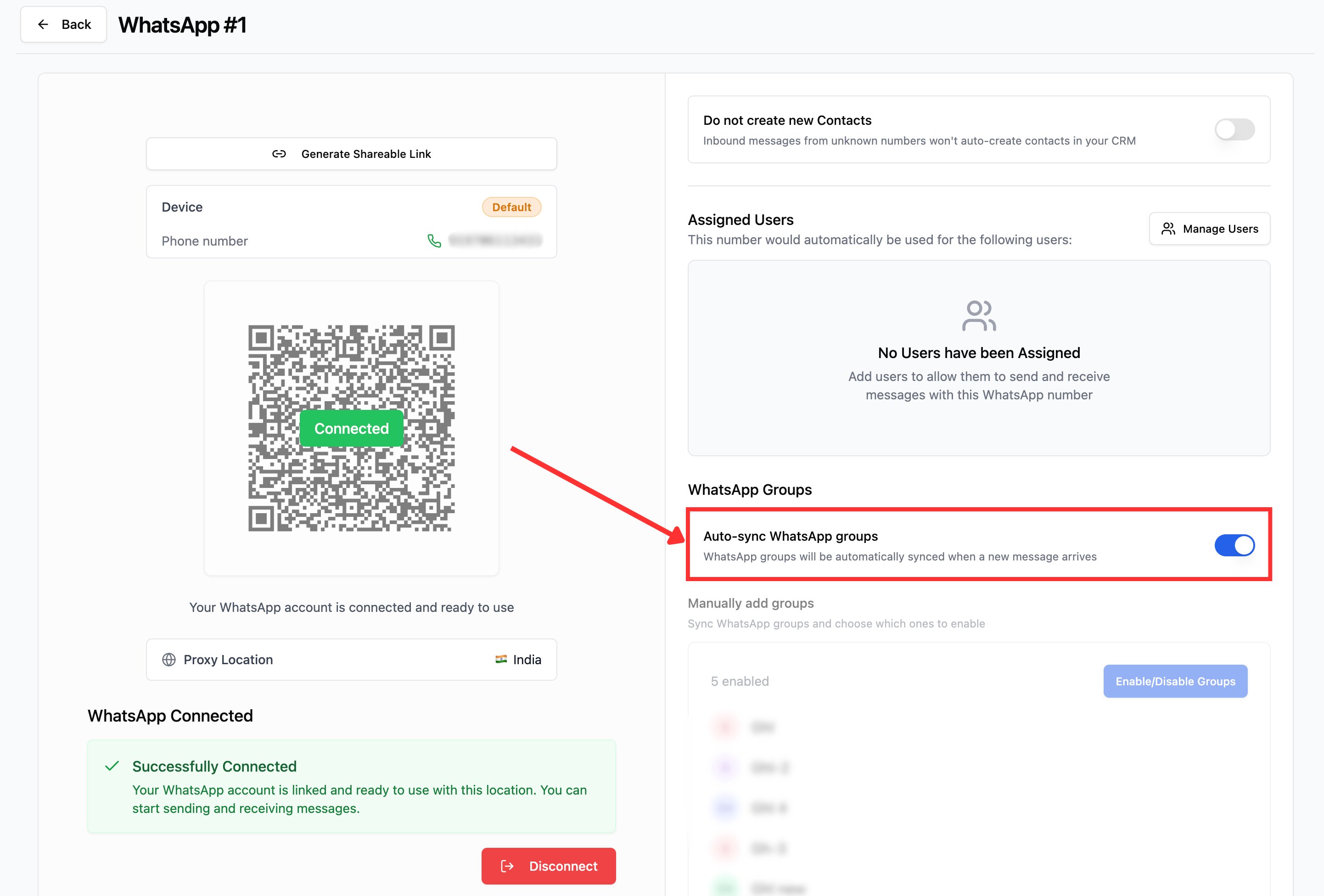
If you'd rather not pick groups manually, turn on **Auto-sync WhatsApp groups** - every group is added automatically the moment its first message arrives.
***
## Auto-sync WhatsApp Groups
If you'd rather not pick groups manually, turn on **Auto-sync WhatsApp groups** - every group is added automatically the moment its first message arrives.
 ## How to Enable Auto-sync
Go to your **Message hub tab** inside the CRM
Click **Manage** on the WhatsApp number you want to enable groups for
Under **WhatsApp Groups**, toggle **Auto-sync WhatsApp groups** on
Once enabled:
* Any WhatsApp group is automatically synced when first message arrives in the group
* The **Manually add groups** section is disabled - turn auto-sync off if you want to pick groups manually
***
## Community Announcements
With Community Announcements, you can:
* Send one-way updates to **all group members** at once
* Share important information without triggering group clutter
* Use workflows to schedule or automate announcements
* Combine with voice notes, media, and more for maximum impact
***
## Example Use Cases
* A real estate agency sending property updates to an investor group
* A coaching business sharing homework, resources, or reminders to a student group
* A marketing agency sending promo codes to brand ambassador groups
* Communities broadcasting announcements without back-and-forth clutter
***
## Support
If you face any issues or need onboarding support:
* **WhatsApp Support:** Reach out to us [here](https://wa.me/+12267248710?text=Hi%2C%20I%20need%20help%20with%20WhatsApp%20Groups%20and%20Community%20Announcements)
* **Email:** [support@messagesync.ai](mailto:support@messagesync.ai)
***
## FAQs
No. You have the option to select only the groups you want to integrate with the CRM.
Each group is assigned a random number and behaves like a normal contact. You can chat, automate, and run workflows.
You can exclude private groups during setup. Only business-relevant groups need to be enabled.
Yes. Groups fully support workflows, triggers, and automations inside the CRM.
They are one-way broadcast messages you can send to all group members without cluttering group conversations.
## How to Enable Auto-sync
Go to your **Message hub tab** inside the CRM
Click **Manage** on the WhatsApp number you want to enable groups for
Under **WhatsApp Groups**, toggle **Auto-sync WhatsApp groups** on
Once enabled:
* Any WhatsApp group is automatically synced when first message arrives in the group
* The **Manually add groups** section is disabled - turn auto-sync off if you want to pick groups manually
***
## Community Announcements
With Community Announcements, you can:
* Send one-way updates to **all group members** at once
* Share important information without triggering group clutter
* Use workflows to schedule or automate announcements
* Combine with voice notes, media, and more for maximum impact
***
## Example Use Cases
* A real estate agency sending property updates to an investor group
* A coaching business sharing homework, resources, or reminders to a student group
* A marketing agency sending promo codes to brand ambassador groups
* Communities broadcasting announcements without back-and-forth clutter
***
## Support
If you face any issues or need onboarding support:
* **WhatsApp Support:** Reach out to us [here](https://wa.me/+12267248710?text=Hi%2C%20I%20need%20help%20with%20WhatsApp%20Groups%20and%20Community%20Announcements)
* **Email:** [support@messagesync.ai](mailto:support@messagesync.ai)
***
## FAQs
No. You have the option to select only the groups you want to integrate with the CRM.
Each group is assigned a random number and behaves like a normal contact. You can chat, automate, and run workflows.
You can exclude private groups during setup. Only business-relevant groups need to be enabled.
Yes. Groups fully support workflows, triggers, and automations inside the CRM.
They are one-way broadcast messages you can send to all group members without cluttering group conversations.