

Key Benefits
Automated Welcomes - Greet every new member the moment they join Onboarding & Off-boarding - Trigger sequences on add or remove events Admin Visibility - Know who changed group membership and when Filtered Automation - Trigger only on the groups or events you care about Zero Manual Monitoring - No need to watch group membership by handWho Should Use It
Community managers - Welcome and onboard new group members automatically Sales teams - Track when prospects join or leave a group Agencies - Monitor group membership across client sub-accounts Membership / course operators - Sync group access changes with your CRMRequirements
Before using this trigger, update your Whatsapp provider app to the latest version:1
Go to App Marketplace → Installed Apps
2
Find Whatsapp provider
3
Click Update if available
How to Set Up
Step 1: Create a New Workflow
1
Go to Automation → Workflows
2
Click Create Workflow or + Add
3
Select Start from Scratch
Step 2: Add the Trigger
1
Click Add New Trigger
2
Switch to the Apps tab (not the default triggers)
3
Find and click the Whatsapp provider app icon
4
Select WhatsApp Group Participant Change from the dropdown
5
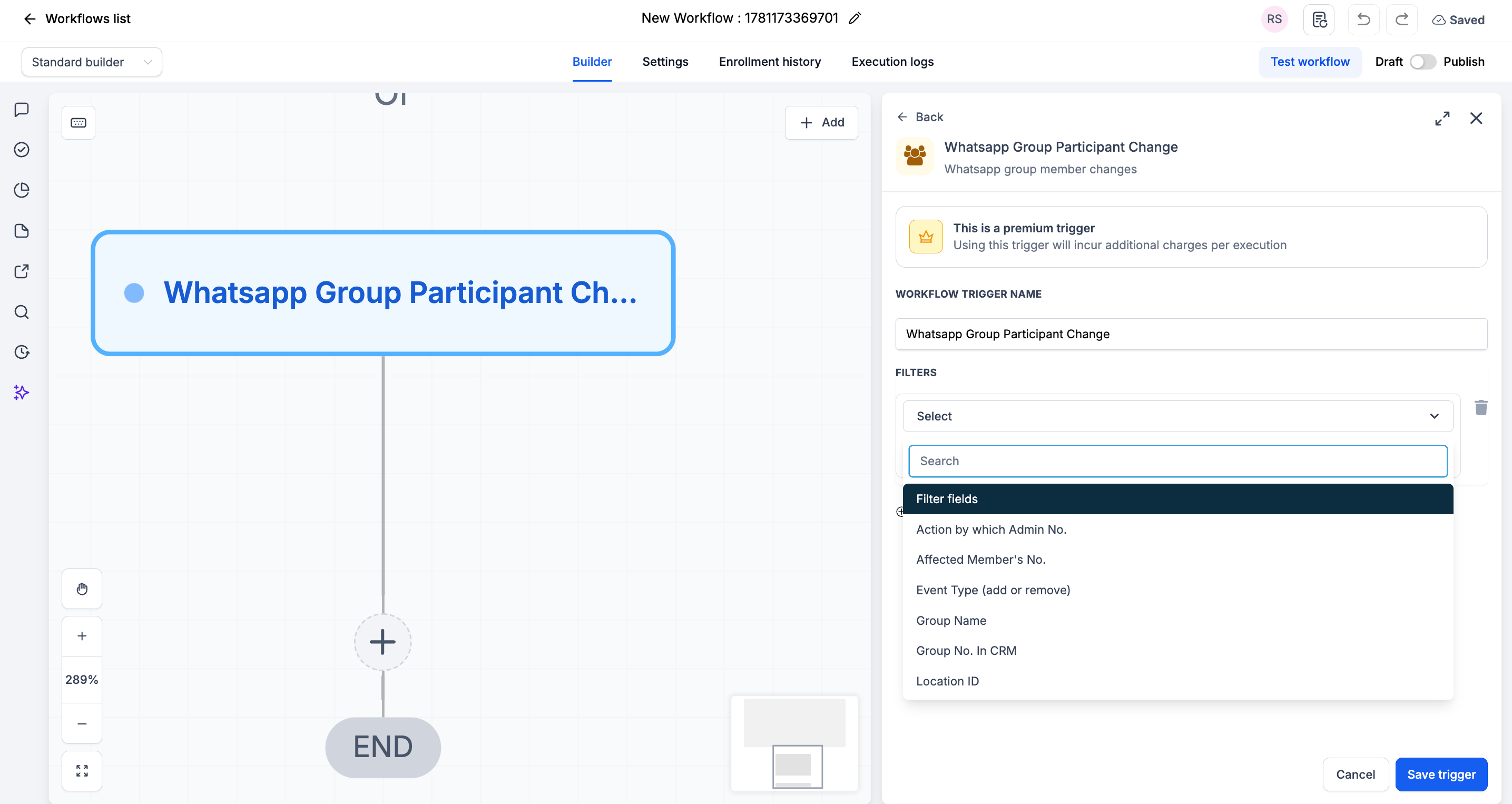
(Optional) Add Filters to narrow when the trigger fires
6
Click Save trigger
Step 3: Add Your Actions
Add any actions you want to execute when group membership changes:- Send WhatsApp Message → Welcome a new member
- Add / Remove from Workflow → Start onboarding or off-boarding
- Update Contact / Tag → Reflect group membership in the CRM
- Send Internal Notification → Alert an admin of the change
Step 4: Save and Publish
1
Review your workflow
2
Click Save
3
Toggle workflow from Draft to Published
Available Filters
Use filters to control exactly which membership changes start the workflow. Each filter can be paired with an operator (equals, contains, etc.).Example Use Cases
Use Case 1: Welcome New Members
Greet everyone who joins. Trigger: WhatsApp Group Participant Change Filter: Event Type equals add Action: Send a welcome WhatsApp message and start the onboarding workflow.Use Case 2: Off-Board Removed Members
Clean up when someone leaves. Trigger: WhatsApp Group Participant Change Filter: Event Type equals remove Action: Remove the contact’s group tag and notify the admin.Important Notes
Technical Details
- The trigger fires once per participant change event
- Use the Event Type filter to separate add and remove flows
- Filters are optional - leave them blank to fire on every membership change
Best Practices
- Build separate workflows for add vs. remove using the Event Type filter
- Use the Group Name or Group No. in CRM filter to target a specific group
- Test by adding and removing a test member from a connected group
FAQs
Can I tell whether a member was added or removed?
Can I tell whether a member was added or removed?
Yes. Use the Event Type (add or remove) filter, or branch your workflow based on it.
Do I have to add filters?
Do I have to add filters?
No. Filters are optional. Without them, the trigger fires on every add and remove event across your groups.
Support
If you need help with the setup or onboarding:- Email: support@messagesync.ai