

WhatsApp Groups & Community Announcements
We’re excited to announce that WhatsApp Groups and Community Announcements are now fully supported on our system! You can now send, receive, and automate group conversations directly inside the CRM, just like you would with individual contacts.What It Does
- Connect your existing WhatsApp Groups to the CRM
- Choose which groups to enable (no need to connect private or irrelevant ones)
- Auto-sync groups on first message no manual setup required
- Send and receive group messages directly inside the CRM Conversations tab
- Automate group interactions using CRM workflows
- Assign each group a unique identifier so they behave like regular contacts
- Leverage Community Announcements for one-way broadcasts to large audiences
Key Benefits
- Centralized communication: Handle individual + group chats inside CRM
- Selective control: Enable only the groups you want for business use
- Automation ready: Trigger workflows, reminders, or broadcasts to groups
- Scalable outreach: Use Community Announcements for bulk, one-to-many updates
- Better client engagement: Collaborate with teams, communities, or clients without switching platforms
Who Should Use It
- Agencies managing multiple client groups or communities
- Real estate teams handling property discussion groups
- Coaches and consultants running private student/mentee groups
- Support teams offering group updates or onboarding sessions
- Community managers who want to keep announcements and engagement structured
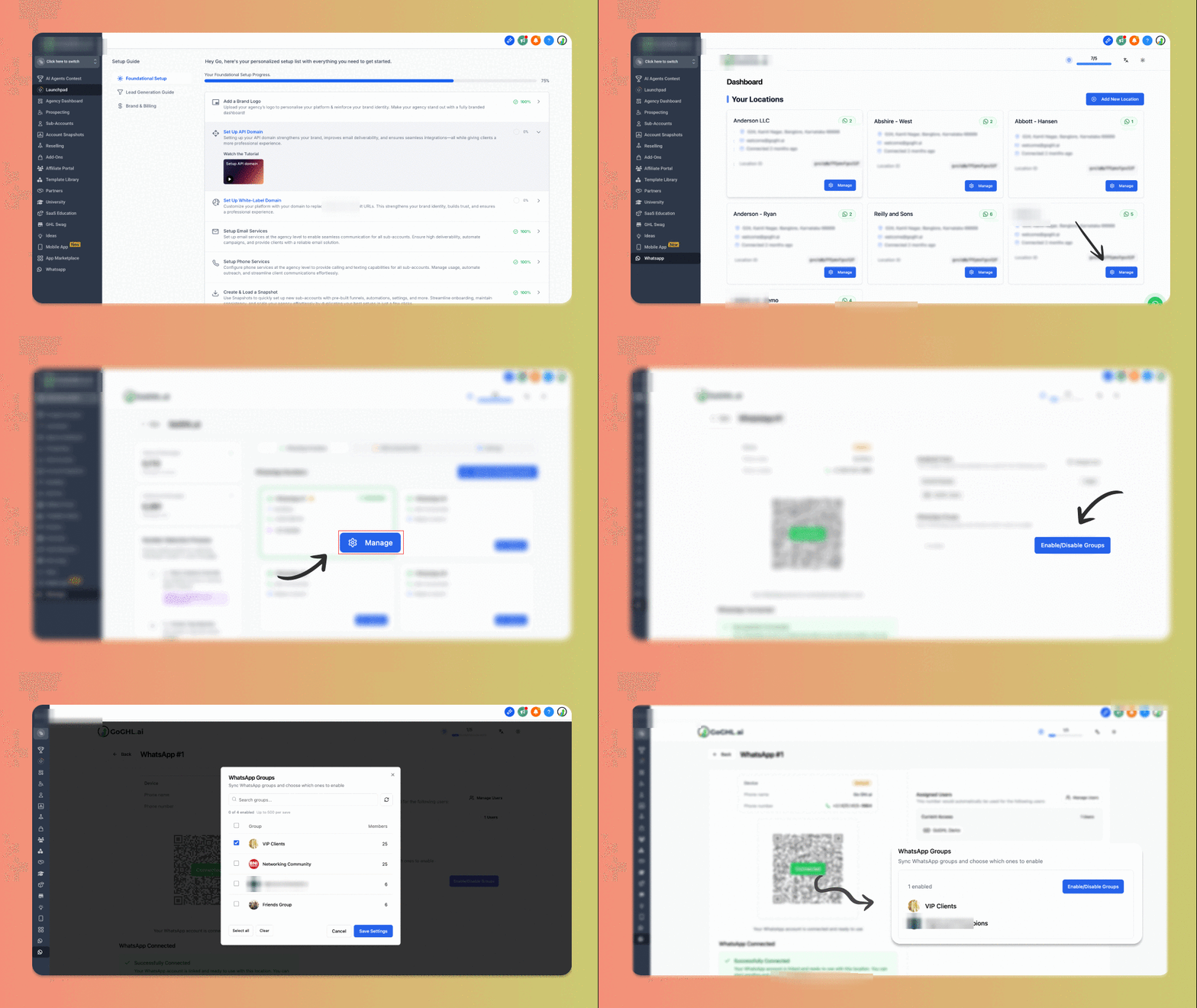
How to Enable WhatsApp Groups
1
Go to your Message hub tab inside the CRM
2
Click Manage on the WhatsApp number you want to enable groups for
3
Under the Manage WhatsApp view, click Enable/Disable Groups
4
Select only the groups you want to enable in CRM (leave out private groups)
5
Save changes
- Groups appear in your CRM dashboard like regular contacts
- You can send/receive messages in Conversations
- You can run automations & workflows on group interactions
Auto-sync WhatsApp Groups
If you’d rather not pick groups manually, turn on Auto-sync WhatsApp groups - every group is added automatically the moment its first message arrives.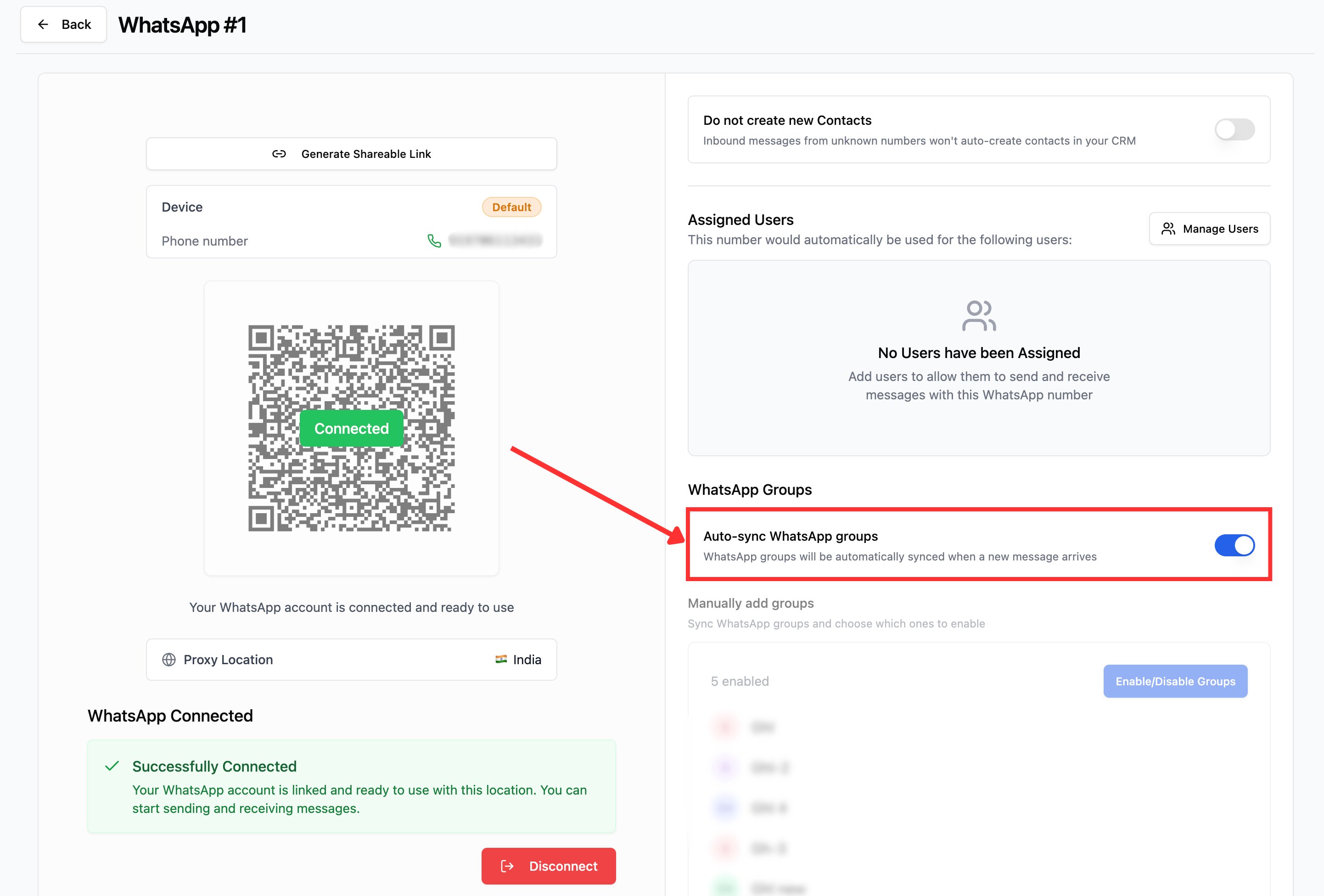
How to Enable Auto-sync
1
Go to your Message hub tab inside the CRM
2
Click Manage on the WhatsApp number you want to enable groups for
3
Under WhatsApp Groups, toggle Auto-sync WhatsApp groups on
- Any WhatsApp group is automatically synced when first message arrives in the group
- The Manually add groups section is disabled - turn auto-sync off if you want to pick groups manually
Community Announcements
With Community Announcements, you can:- Send one-way updates to all group members at once
- Share important information without triggering group clutter
- Use workflows to schedule or automate announcements
- Combine with voice notes, media, and more for maximum impact
Example Use Cases
- A real estate agency sending property updates to an investor group
- A coaching business sharing homework, resources, or reminders to a student group
- A marketing agency sending promo codes to brand ambassador groups
- Communities broadcasting announcements without back-and-forth clutter
Support
If you face any issues or need onboarding support:- Email: support@messagesync.ai
FAQs
Can I enable all my WhatsApp groups at once?
Can I enable all my WhatsApp groups at once?
No. You have the option to select only the groups you want to integrate with the CRM.
How do groups show up in CRM?
How do groups show up in CRM?
Each group is assigned a random number and behaves like a normal contact. You can chat, automate, and run workflows.
What about private or personal groups?
What about private or personal groups?
You can exclude private groups during setup. Only business-relevant groups need to be enabled.
Can I automate messages to groups?
Can I automate messages to groups?
Yes. Groups fully support workflows, triggers, and automations inside the CRM.
What are Community Announcements?
What are Community Announcements?
They are one-way broadcast messages you can send to all group members without cluttering group conversations.