

What It Does
The Speech-to-Text feature automatically transcribes any incoming WhatsApp voice note inside your CRM dashboard using your OpenAI API key. This allows you to see the transcription directly under the voice note in the conversation tab - no need to switch apps. You can also use the transcription text in automations, triggers, or workflows. It’s built to consume minimal OpenAI credits, and it even works with the free ChatGPT plan.Key Benefits
- Automatically transcribe all incoming voice notes inside CRM.
- Transcriptions appear directly under the voice note in conversations.
- Use transcriptions in automations and workflows.
- Works with OpenAI Free & Paid plans.
- Easy one-time setup with your own API key.
- Text-to-Speech (TTS) support coming soon - convert messages to speech audio!
Who Can Use It
- Agencies that want searchable logs of WhatsApp conversations.
- Support teams that need quick access to what customers said without replaying audios.
- Sales reps and consultants who rely on WhatsApp voice notes.
- Teams building automation workflows based on client inputs.
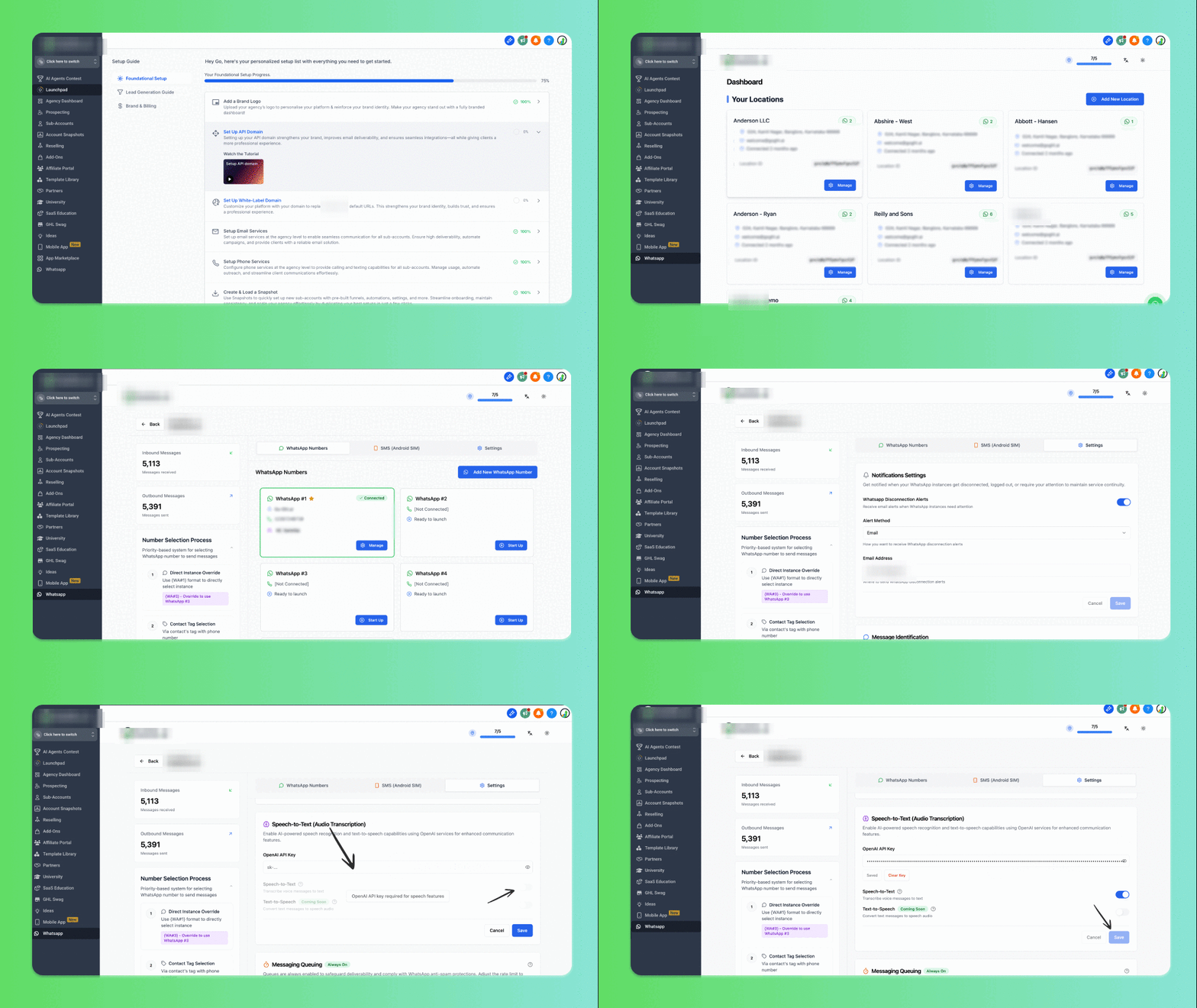
How to Activate Speech-to-Text in CRM
You can activate this feature either from Sub-Location View.Steps:
1
Go to Message Hub Tab.
2
Go to Settings.
3
Scroll down to the Speech-to-Text (Audio Transcription) section.
4
Enter your OpenAI API Key.
5
Toggle Enable Speech-to-Text and click Save. That’s it! All future audio notes for that location will be automatically transcribed.
How to Get Your OpenAI API Key
1
Go to OpenAI API Keys.
2
Log in with your OpenAI account.
3
Click Create New Secret Key.
4
Copy the generated key.
5
Paste it into the Speech-to-Text settings inside integration dashboard.
How to Use
- Go to the Conversations tab inside your CRM dashboard.
- Open any WhatsApp chat with a voice note.
- Right under the audio note, you’ll now see the transcription text.
- Use this text in workflows, automations, or searches.
Support
If you need help with the setup or onboarding:- Email: support@messagesync.ai
FAQs
Does this consume a lot of OpenAI credits?
Does this consume a lot of OpenAI credits?
No. It has been optimized to minimize usage and can even work with the free plan.
Can I use automations with the transcription?
Can I use automations with the transcription?
Yes. Since the transcription text appears inside the conversation, you can trigger workflows from it.
Is Text-to-Speech supported?
Is Text-to-Speech supported?
Not yet, but Text-to-Speech (convert messages into voice notes) is coming soon.
Do I need a paid OpenAI account?
Do I need a paid OpenAI account?
No, the feature works with both free and paid OpenAI accounts.