

Why it matters: Batch drips are either too slow or too risky. This integration strikes the right balance so you can scale confidently.
What it does
- Per-second rate control for WhatsApp (not per-minute batches)
- Smooth, reliable delivery for campaigns and automations
- Fewer platform flags and significantly reduced ban risk
- No random disconnects or missed syncs caused by burst sending
Who should use this
- Agencies running bulk outreach across many sub-accounts
- Marketers and sales teams doing promotions, follow-ups, reminders
- Any CRM user who has faced disconnects or bans with batch drips
- Teams who want predictable deliverability without babysitting campaigns
When to use (recommended profiles)”)
- Bulk campaigns: 1 message every 15 seconds (safe high-volume mode)
- Everyday workflows: 1 message every 3–5 seconds
- New/warming numbers: Start at 10–20 seconds, then reduce gradually
No solution can guarantee 100% ban prevention. Controlled pacing + warmed numbers + opt-ins = best outcomes.
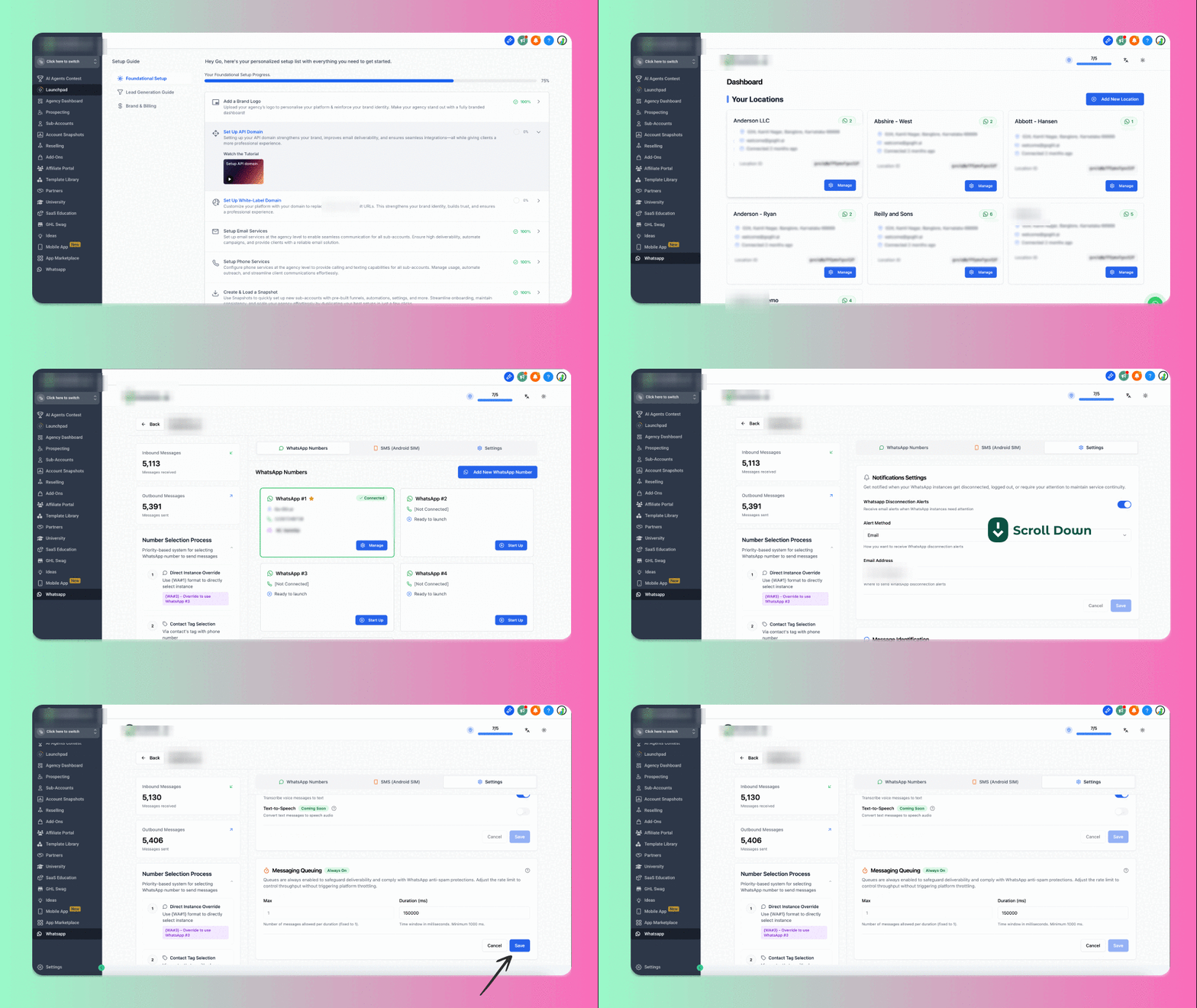
How to set it up
1
Open the target Location in your Message Hub dashboard
2
Go to Settings › Message Queuing (the queue is always ON)
3
Configure:
- Max: number of messages per duration (fixed to 1)
- Duration (ms): time between messages (minimum 1000 ms = 1s)
4
Click Save Settings
Suggested values
- Bulk campaigns
- Daily workflows
- Number warm-up
- Max:
1 - Duration (ms):
15000(≈ 15s/message)
Tip: Set once per location. Adjust up/down based on reply rate, opt-ins, and account reputation.
Why this Drip beats batch drips
Best practices (quick checklist)”)
- Warm numbers first; start slow, increase gradually
- Message opted-in contacts; encourage replies (two-way = safer)
- Mix content (text, emoji, image/voice) to keep it human
- Avoid heavy promos early; keep messages helpful/informational
- Monitor blocks, reply rates, and any warning banners in WhatsApp
Troubleshooting
- Still too slow? Lower the Duration (ms) by small increments.
- Got flagged? Increase duration temporarily; verify opt-ins; warm more.
- Running multiple campaigns? Pace per location based on total volume.
Support
We’re happy to help you pick the right rate for your use case.- Email: support@messagesync.ai
FAQs
Does Drip Mode guarantee no bans?
Does Drip Mode guarantee no bans?
No system can promise 100%. Drip Mode significantly reduces risk by pacing sends per second and avoiding burst behavior. Combine with warm-up and opt-ins for best results.
Can I use different settings per location?
Can I use different settings per location?
Yes. Configure Message Queuing per Location so each client’s throughput matches their volume and risk profile.
Is the queue always enabled?
Is the queue always enabled?
Yes. The queue is always on to protect deliverability. You control the Duration (ms) to fit the workload.
How do I choose my starting settings?
How do I choose my starting settings?
New numbers: start 10–20s; Ongoing workflows: 3–5s; Big blasts: 15s (or more if reputation is weak).