

Key Benefits
Instant Call-Back - Reach out the moment a call is missed Lead Recovery - Turn missed calls into booked conversations Team Alerts - Notify the right rep immediately Filtered Automation - Trigger only on calls that match your criteria Zero Manual Monitoring - No need to watch the call logWho Should Use It
Sales teams - Auto-respond to missed calls before the lead moves on Support teams - Queue call-backs and track response times Agencies - Ensure missed calls are handled across client sub-accounts High-volume operations - Recover missed calls automatically at scaleRequirements
Before using this trigger, update your Whatsapp provider app to the latest version:1
Go to App Marketplace → Installed Apps
2
Find Whatsapp provider
3
Click Update if available
How to Set Up
Step 1: Create a New Workflow
1
Go to Automation → Workflows
2
Click Create Workflow or + Add
3
Select Start from Scratch
Step 2: Add the Trigger
1
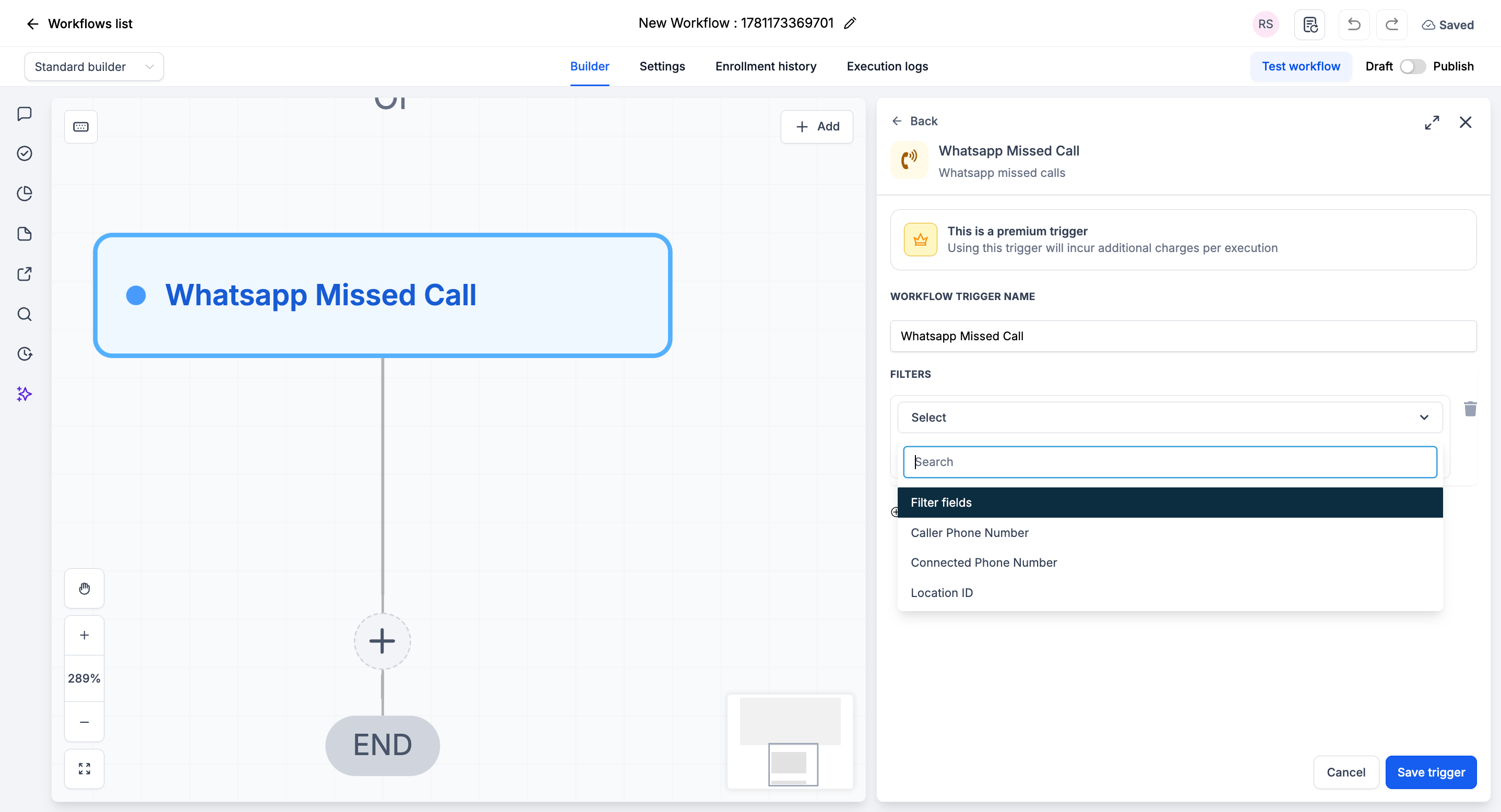
Click Add New Trigger
2
Switch to the Apps tab (not the default triggers)
3
Find and click the Whatsapp provider app icon
4
Select WhatsApp Missed Call from the dropdown
5
(Optional) Add Filters to narrow when the trigger fires
6
Click Save trigger
Step 3: Add Your Actions
Add any actions you want to execute when a WhatsApp call is missed:- Send WhatsApp / SMS Message → “Sorry we missed your call - how can we help?”
- Create Task → Assign a call-back to the right rep
- Send Internal Notification → Alert your team channel
- Add to Workflow / Pipeline → Start a lead-recovery sequence
Step 4: Save and Publish
1
Review your workflow
2
Click Save
3
Toggle workflow from Draft to Published
Available Filters
Use filters to control exactly which missed calls start the workflow. Each filter can be paired with an operator (equals, contains, etc.).Example Use Cases
Use Case 1: Instant Missed-Call Text Back
Never let a missed call go silent. Trigger: WhatsApp Missed Call Action: Send a WhatsApp message: “Sorry we missed your call! Reply here and we’ll help right away.”Use Case 2: Assign a Call-Back Task
Make sure someone follows up. Trigger: WhatsApp Missed Call Action: Create a high-priority task to callCaller Phone Number back within 15 minutes.
Important Notes
Technical Details
- The trigger fires once per missed call
- Filters are optional - leave them blank to fire on every missed WhatsApp call
- Executes immediately when the missed call is detected
Best Practices
- Pair this trigger with an immediate text-back for the fastest recovery
- Use the Connected Phone Number filter when running multiple numbers
- Test by placing a call to your connected number and letting it go unanswered
FAQs
Does this fire for calls I decline as well as ones I don't answer?
Does this fire for calls I decline as well as ones I don't answer?
The trigger fires when a call is registered as missed (unanswered). Behavior for declined calls depends on how the call is reported by WhatsApp.
Do I have to add filters?
Do I have to add filters?
No. Filters are optional. Without them, the trigger fires on every missed WhatsApp call.
Support
If you need help with the setup or onboarding:- Email: support@messagesync.ai